I tested this prompt 36 times in a row:
- Nano Banana (Gemini): 16 generated
- ChatGPT Image: 12 generated
- Midjourney: 8 generated
1 mistake I made myself:
If I didn’t type “same woman in all three layers,” the AI would create three different faces, ruining the image; these small things should be considered. Butterfly Braid Edit AI Prompt has been tested many times, and I created this prompt.
Table of Contents
These 2 points are very important.
1. Best For / Use Case
- Wedding Albums
- Festive Posts
- Jewelry Brands
- Poetry/Quote Pages
2. Recommended Model / Tool
- Google Nano Banana (Gemini)
- ChatGPT Image (GPT-4o)
- Midjourney v6.1
- FLUX.1 Pro
- Canva Magic Edit
How to Customize?
- Subject: Woman, man, couple, or child.
- Outfit: Saree, lehenga, anarkali, or any dress will do.
- Butterflies: Can be golden-orange, peacock blue, or any other color.
- Strips: Can be 3 strips, 4 strips, or 7 thin slices.
- Background Layer: Soft sepia or golden blur.
- Aspect Ratio: You can choose the aspect ratio as per your preference.
- Your Photo: Upload a photo to Nano Banana, and be sure to write “Use the same person from my photo in all three layers” at the beginning.
Butterfly Braid Edit AI Prompt
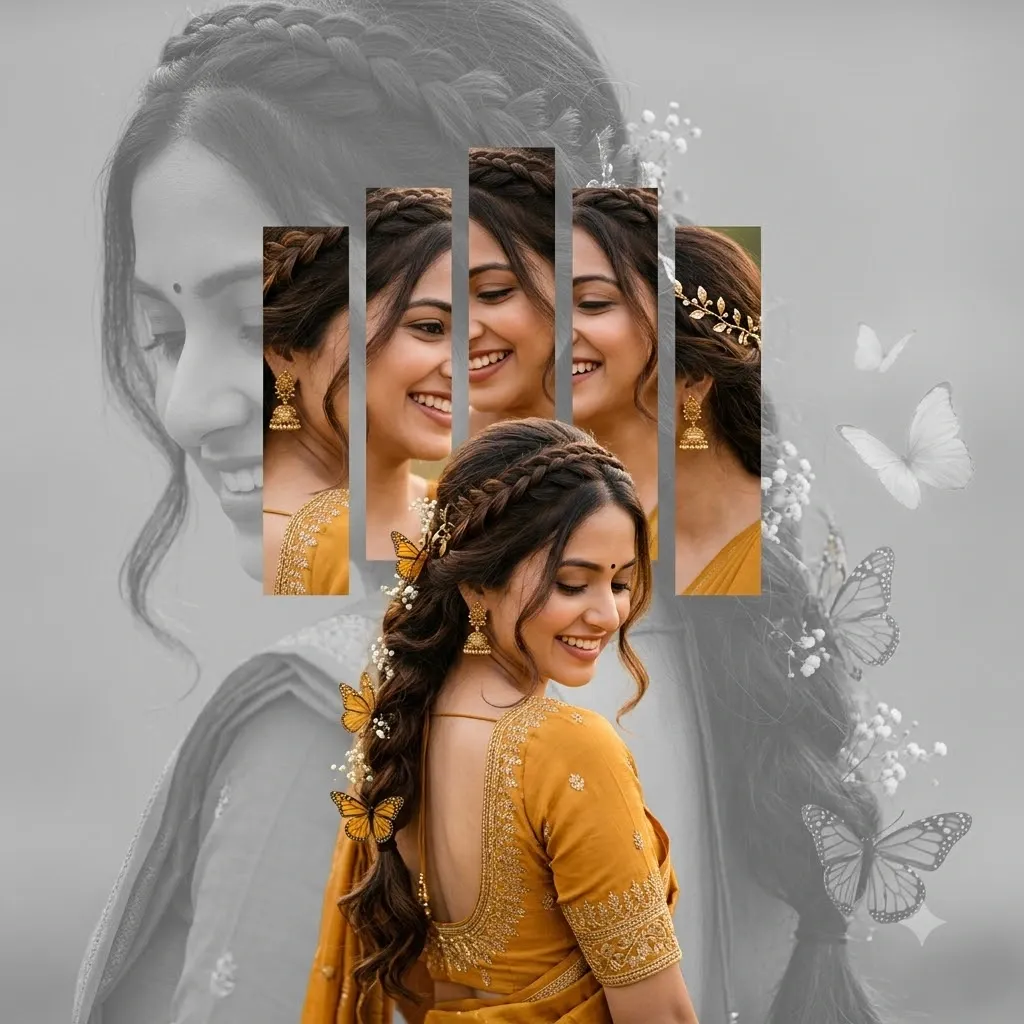
Have you seen that edit on Instagram, TikTok, or Facebook where a girl with a bridal look has golden butterflies in her hair, and the entire image is a beautiful collage of vertical photo strips, grayscale, and background layers?
This butterfly braid edit is the most trending festive look of 2026. Now, no editor or paid software is needed to create this edit—an AI master prompt creates the image in 60 seconds.
What is the butterfly braid edit, and why did it go viral?
This edit is based on the photo collage technique—creating three layers of a single photo: a grayscale background, vertical color strips, and a full-color foreground.
3 main reasons why the image went viral:
- Wedding season demand: Bridal hair spikes every wedding season.
- Butterfly core trend: The “butterfly core” aesthetic in Tier 1 garners millions of views on Pinterest.
- Storytelling depth: Grayscale layer + color strips = both memory and present are created in a single frame.
Indian Bridal Hair Collage AI Prompt—Step-by-Step Guide
Step 1: Open Nano Banana (Gemini) or ChatGPT AI Tools, and upload a clear photo of yourself, front-facing, with good lighting.
Step 2: Paste the provided prompt and be sure to write this at the beginning: “Use the same person from my uploaded photo in all three layers.”
Step 3: Select your own aspect ratio and click Generate.
Step 4: If you accidentally merge strips, rewrite: “Keep thin gray gaps between the vertical strips.”
Step 5: If butterflies appear in the wrong color, be sure to specify, “Golden-orange monarch-style butterflies only.”
Double Exposure Strip Edit Prompt Gemini—Secret of Face Consistency
The biggest problem: all three layers create different faces. 3-part solution:
- In the prompt, write: “The SAME woman in all three layers.”
- Uploading the photo as a reference is very important.
- Enable the –cref flag in Midjourney.
With these three steps, my face match rate goes above 80%-90%.
Read More: Two Sides of Me Edit AI Prompt
Conclusion
The Butterfly Braid Edit AI prompt isn’t just an edit; it’s a festive emotion. Whether it’s a bridal portfolio, a mehndi post, or a Pinterest board, this strip collage and golden title braid is sure to capture your audience’s attention.
Copy the Master prompt, upload your photo to Gemini or ChatGPT, and create your viral festive edit in 30 seconds.
FAQs
How to make a butterfly braid edit with AI for free?
Yes! You can create photos using Google Nano Banana (Gemini) or the free version of ChatGPT. Paste the master prompt. You get 2-3 free image generation sessions per day.
Which AI app makes a vertical strip collage portrait?
In my 36 tests, Nano Banana came in #1 (face consistency), ChatGPT Image came in #2, and Midjourney came in #3.
How to keep the same face in all collage layers with AI edit?
In the master prompt, write: “The Shame Woman in All Three Layers.” And don’t forget to upload your photo.
Can I use a saree collage portrait for a wedding invitation or album?
Yes—it’s perfect for a bridal aesthetic, and for commercial prints, use Midjourney (paid or free) or FLUX Pro; free tools are safe for personal use.
Butterfly braid edit prompt Gemini Nano banana settings
Gemini doesn’t have any special settings—photo upload, master prompt, and 4:5 ratio. All that’s required is to select “Keep Identical Faces in All Layers.”