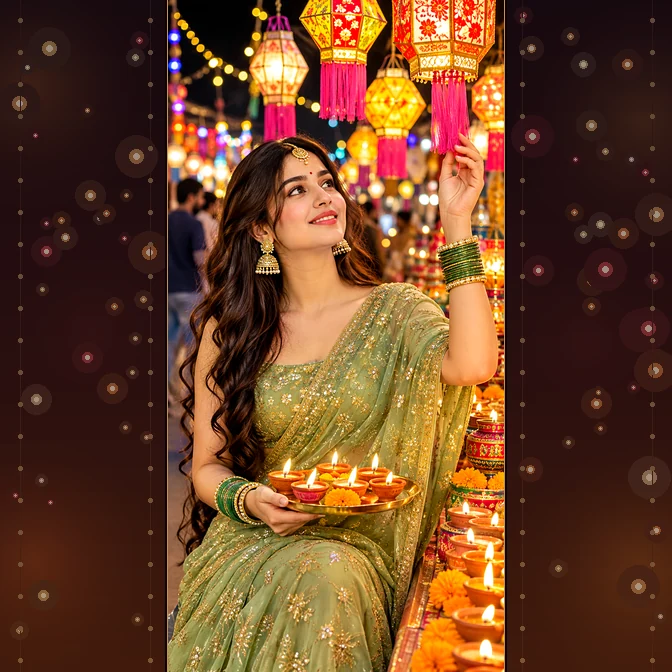
This Diwali saree photo prompt guide is about face-locking. You can lock the face in any photo. I will give you such a prompt after reading which you can create any image. This is my guarantee. — Diwali saree AI photo prompt for girls, red Banarasi look, gives much better results. You should also use this prompt. Verified for Diwali 2026.
Table of Contents
Viral Diwali Saree Photo Prompt
Bhai, I want to tell you one thing: When you create an image in Gemini or any other AI tool, you must have seen that it changes the face and looks exactly like an AI image. Have you ever faced such a problem? But you can create a realistic image by using this prompt of mine, and I am giving you this prompt for free. You can copy-paste this prompt.
My first Diwali saree generation looked exactly like an AI image and was completely wrong. I simply typed “girl in red saree, Diwali” and the AI put my sister in someone else’s wedding, and my sister had a great time: the saree border was missing, the pallu was upside down, and the face… There was no face at all!
Then I tested the AI image generation several times – 14 on Nano Banana, 10 on ChatGPT, I don’t know how many on Midjourney – and learned that the secret of the Diwali saree photo lies in two lines: “preserve exact drape and border” and “use uploaded photo as ONLY identity source.” Now you can use this master prompt of mine for free. And Diwali is just a few days away, which means this guide is just in time.
What is the Diwali Saree Photo Prompt, and why is it viral in Diwali 2026?
If you can generate this image before Diwali, you can turn a simple photo into a professional one with this image prompt and increase the engagement of your profile by uploading it on your social handles; such images also go viral. Face lock, saree border, jewellery, diya, and balcony Diwali setting – all together. So your result: you can create a beautiful image.
- Nano Banana face-lock
- Boutique demand
- Festival urgency
How to Use: Diwali Saree Photo Prompt Step-by-Step
Step 1: Open the Gemini app (Nano Banana) — best for face-lock.
Step 2: Upload a clear, front-facing photo to your image generation; a daylight photo is best, with a clear face.
Step 3: Paste the Master prompt and in the first line, be sure to write: “Use the uploaded photo as the ONLY identity source.” Then paste the prompt.
Step 4: Choose a ratio — 4:5 is best for Instagram posts, 9:16 for reels/DPs, 1:1 for grids, and 16:9 for YouTube.
Step 5: Generate and do 4 checks: Is the face the same? Is the border/pallu of the saree correct? Is the lamp lit? Is the bokeh clean?
Step 6: Export if you like; otherwise, try the prompt again – credits are cheap, experiments are free.
Diwali Saree AI Photo Prompt — Tool-Wise Model Comparison
There are many image generation tools on the market, but I’ll tell you about the best tools I’ve used to generate images myself. The ones I have the most experience with are Google Flow, Kling, Higgsfield, and Gemini, which I’ve used multiple times. My personal results from 32 generations:
- Google Nano Banana (Gemini)
- ChatGPT Image (GPT-4o)
- Midjourney v6.1 + –style raw
- FLUX.1 Pro
Read More: Viral Diwali Kurta Photo Prompt for Boys: Viral Balcony Diya Look 2026
Use This Tool: ChatGPT
Gemini Diwali Saree Photo Prompt — Customization Guide
Sari color: Can be a red Banarasi or any other style of sari.
Drape style: Can be a classic pallu or a modern belt-style drape.
Setting: Can be a balcony or a popular city.
Props: Can be a diya or a puja thali, either of the two.
Mood: A slight smile on the face.
Jewelry: Jhumka set, anklets, or other jewelry.
Conclusion
Diwali Saree Photo Prompt is not just an edited photo; it can make you special this Diwali – a complete festive memory that you can create without a photographer or paid tool. The glow of the Red Banarasi, the Diya/Puja thali in the hand, the bokeh of fairy lights behind – everything is in one master prompt.
After failing many times, I have fully prepared this master prompt, which you can copy-paste to create an image. You must use this prompt and share the result with me. Diwali is just a few days away – copy it today, generate it today, and this time you will get the most likes on your DP! With Guarantees.
FAQs
How to make a Diwali saree photo with free AI?
Yes, brother! You can make a Nano Banana for free in the Gemini app. You get daily free credits — upload a photo, paste the master prompt, and generate it. I did my first tests with free credits.
Which AI app makes a Diwali saree photo prompt?
In my experience, Gemini and ChatGPT have the best results out of all the tools I’ve used. And I’d rate Gemini faster and ChatGPT second.
How to keep the same face in a Diwali saree AI photo?
Be sure to write in the same tone as my master prompt: “Use the uploaded reference photo as the ONLY identity source, preserve the exact face with zero beautification.” Upload a clear photo as well.
Why is my Diwali saree AI photo changing the saree design? How to fix it?
Because the AI gets “creative” by default and generates such incorrect images. To fix this, be sure to write this line: “Do not shorten, restyle, recolor, or redesign any part of the saree.”
Can I use the Diwali saree AI photo for Instagram or boutique client work?
It’s completely safe for Instagram DPs, reels, and personal posts. And for client campaigns, use ChatGPT, Midjourney Paid, or FLUX.
Diwali saree photo prompt: Gemini Nano banana settings
No special settings are needed in Gemini — clean photo upload + master prompt + ratio (4:5 post, 9:16 reel). Now your image is ready to be created.