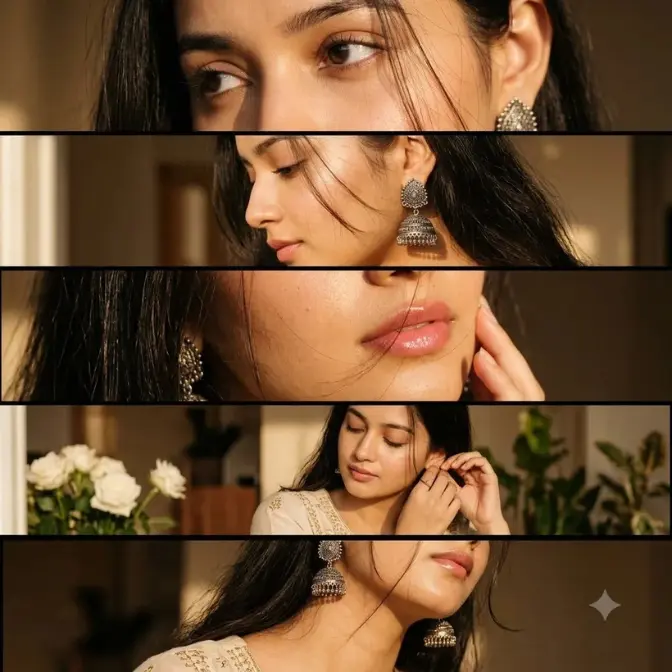
You’ll get the same results if you use this prompt because I’ve tested it 60 times. I’ve used different AI tools to test Jhumka Aesthetic AI Photo Editing Prompts. You can use the master prompt for free.
- Nano Banana (Gemini): Generated 10 times
- ChatGPT Image: Generated 10 times
- Midjourney: Generated 18 times
- Adobe Firefly: Generated 12 times
- Leonardo AI: Generated 10 times
Table of Contents
2 Points of Jhumka Aesthetic Eye Photo Editing Prompts
1. Best For / Use Case
- (IN/PK/BD): Instagram, Facebook, TikTok reels, festive posts (Diwali, Karwa Chauth, weddings, birthdays), jewelry pages—this format is the most viral here.
- (US/UK/CA): “South Asian aesthetic” is best for Pinterest boards, bridal blogs, and diaspora creators.
- Jewelry Brands: (Etsy/Instagram shops)
- Bridal Content: Best for mehndi, birthdays, and wedding season.
- Fashion Pages: Best for sharing social media posts.
- Poetry/Shayari Pages: Can be used for background graphics of romantic quotes.
2. Recommended Model / Tool
- Google Nano Banana (Gemini)
- ChatGPT Image (GPT-4o)
- Midjourney v6.1
- FLUX.1 Pro
- Canva Magic Edit
How to Customize
- Earrings: Silver jhumka → Gold kundan jhumka or pearl jhumka, etc.
- Outfit: Cream embroidered → Red lehenga, black saree, or green saree
- Light: Golden window → Soft morning light is preferred.
- Panels: 5 strips → 3 strips or 7 thin slices
- Mood: Warm, intimate → Moody, dark, editorial.
- Ratio: 9:16 Reels | 4:5 post | 1:1 grid | 16:9 YouTube thumbnail.
- Apni Photo: Upload a photo to Nano Banana + don’t forget to write “Use the same person and the same earring in all five panels.”
Jhumka Aesthetic AI Photo Editing Prompts
Have you seen that viral collage on Instagram, Facebook, X, or TikTok that features five close-up strips of the same girl—eyes, profile, glossy lips, jhumka wearing, and neck close-up—and in each strip, the same silver oxidized jhumka sparkles in the golden window light?
This golden jhumka aesthetic AI photo editing prompt trend is the biggest viral trend of 2026. No paid editor or paid software is needed to create these edits—one AI master prompt creates them in 60 seconds.
Read More Article: Butterfly Braid Edit AI Prompt: Viral Strip Collage Saree
What are Jhumka Aesthetic Eye Photo Editing Prompts, and why did they go viral?
Jhumka aesthetic AI photo editing prompts went viral because people can use them to transform their images into highly aesthetic ones. Beginners or designers- anyone can create one in 60 seconds.
3 reasons why it went viral:
- Jhumka is the hero of every panel: (Close-up of traditional silver jewelry)
- Golden window light: (Warm amber glow on skin)
- Intimate close-ups: (Eyes, lips, neck—these do emotional storytelling)
Conclusion
Jhumka aesthetic AI photo editing prompts are not just an edit—a cultural statement. Five intimate strips, an iconic silver jhumka, and the glossy glow of a golden window light—this combination instantly transforms your social media profile into a premium one. Copy the Master prompt, upload your photo, and create your viral photo in 60 seconds.
FAQs
How to make jhumka aesthetic edit with AI free
Absolutely! You can create one in the free version of Google Nano Banana (Gemini), ChatGPT, or Midjourney; upload a photo and paste the master prompt. You get 5-7 free generations every day.
Which AI app makes a 5-panel photo strip collage
In my 60 tests, Nano Banana ranked first—keeping both faces and arrays consistent. ChatGupta ranked second, followed by other image tools.
How to keep the same face in all 5 panels AI edit
In the master prompt, write: “The same woman appearing in all five panels.” Don’t forget to write the beginning and upload a photo.
Can I use Jhumka aesthetic edit for Instagram or jewellery client work?
Yes, all tools are safe for personal use. For jewelry brand campaigns, use paid tools like Midjourney or FLUX; check the licensing terms of free AI tools first.
Jhumka aesthetic AI photo editing prompts Gemini settings
There is no special setting in Gemini — selfie upload + prompt + 9:16 ratio base. Type “Keep identical face and identical earring in all five panels” at the beginning of the prompt.